

Spectrum Management Automation
Purpose-Built for Spectrum Regulation
SESMA is a complete spectrum management platform for national regulators and event frequency coordinators. Licensing, real-time monitoring, signal decoding, interference analysis, direction-finding coverage, field inspections, complaints and long-term planning — the full lifecycle, from a single web interface.
32+Years experience
16Platform modules
ITU-RAligned measurement
About
Resonix Solutions FZ-LLC
Headquartered in Ras Al Khaimah, UAE, Resonix Solutions is a specialized software house composed of industry experts with over 32 years of combined experience in telecommunications. We develop and publish purpose-built software solutions for core network and spectrum management, serving regulators, mobile operators and event coordinators worldwide.
Our Mission
Provide specialized software for the people who actually run networks and spectrum. For regulators that means one platform that carries a frequency assignment from application to licence, watches the band it was granted in, and can explain every decision years later. Our commitment is to eliminate administrative complexity, enhance officer efficiency, and ensure that every tool delivered is not a generic solution, but a precise fit for the authority we serve.
Why SESMA Exists
Conventional spectrum systems are records of decisions. They store what was assigned, to whom and when — and depend entirely on what an officer chose to type in. SESMA is built on a different premise: a regulator’s authoritative picture of its spectrum must be continuously reconciled against what is actually being radiated. The administrative record and live measurement are held in one platform, and every function of consequence operates across both.
SESMA is not a licensing database with a monitoring viewer attached — it is a single spectrum operations platform.
Capabilities
Key Features
SESMA removes manual administration, shortens interference investigations, and gives spectrum authorities defensible evidence behind every assignment they grant.
End-to-End Licensing Workflow
Dispatcher, frequency officer and manager pipeline with inline clarification threads. On approval the system allocates the licence number, generates a QR validation token and emails the applicant — new issuance, renewal and variation handled identically.
Real-Time Spectrum Monitoring
Live traces from many receivers at once, with a multi-source waterfall wall, observation markers and every issued licence and channel plan painted onto the band. Click a highlighted signal to open the licence record behind it.
Interference Analysis Engine
Frequency availability with duplex pairs and every clashing licence ranked by distance. Full point-to-point microwave analysis with ranked aggressor tree, cross-polar handling and I/N and C/I per link side.
AI Signal Classification
Continuous detection groups contiguous bins into channels and estimates occupied bandwidth to ITU-R 99%. An embedded neural network identifies modulation across 11 schemes, and each emission is scored against the licences in reach.
Live I/Q Streaming & Decoding
Direct-RF I/Q streamed to the browser over WebRTC, with in-browser analogue demodulation and a decode service for DMR, P25, NXDN, D-STAR, YSF, M17 and dPMR — including trunked systems and automatic protocol detection.
Field Inspections & Complaints
Auto-numbered compliance visits with GPS breadcrumb tracks, geotagged evidence and sweep captures — offline-safe and reconciled on reconnect. SLA-tracked interference complaints escalate to a site visit in one click.
Coverage & Propagation
Terrain profiles with Fresnel clearance, ITU-R P.530 link availability, Deygout diffraction and ITM Longley-Rice coverage rendering — computed against the parameters of real licensed sites and exported as an engineering report.
Mission Room & DF Planning
A geo-located operations picture with toggleable layers, 3D venue models and direction-finding coverage heat-maps that predict, cell by cell, how accurately a target can be located by the stations you have.
Frequency Allocation Automation
Measures real occupancy across an event band, then proposes clear channels per device type — wireless microphones, comms, video links — and saves them as channel plans with CSV and PDF export.
Platform in Action
The Product, Not a Mock-up
Every screen below is the live SESMA web interface. Twelve capabilities, walked through in the order an officer meets them: observe the band, identify what is in it, plan around it, locate what should not be there, and engage the people who use it.
01Observe — the live band
Spectrum
Many receivers, one live picture
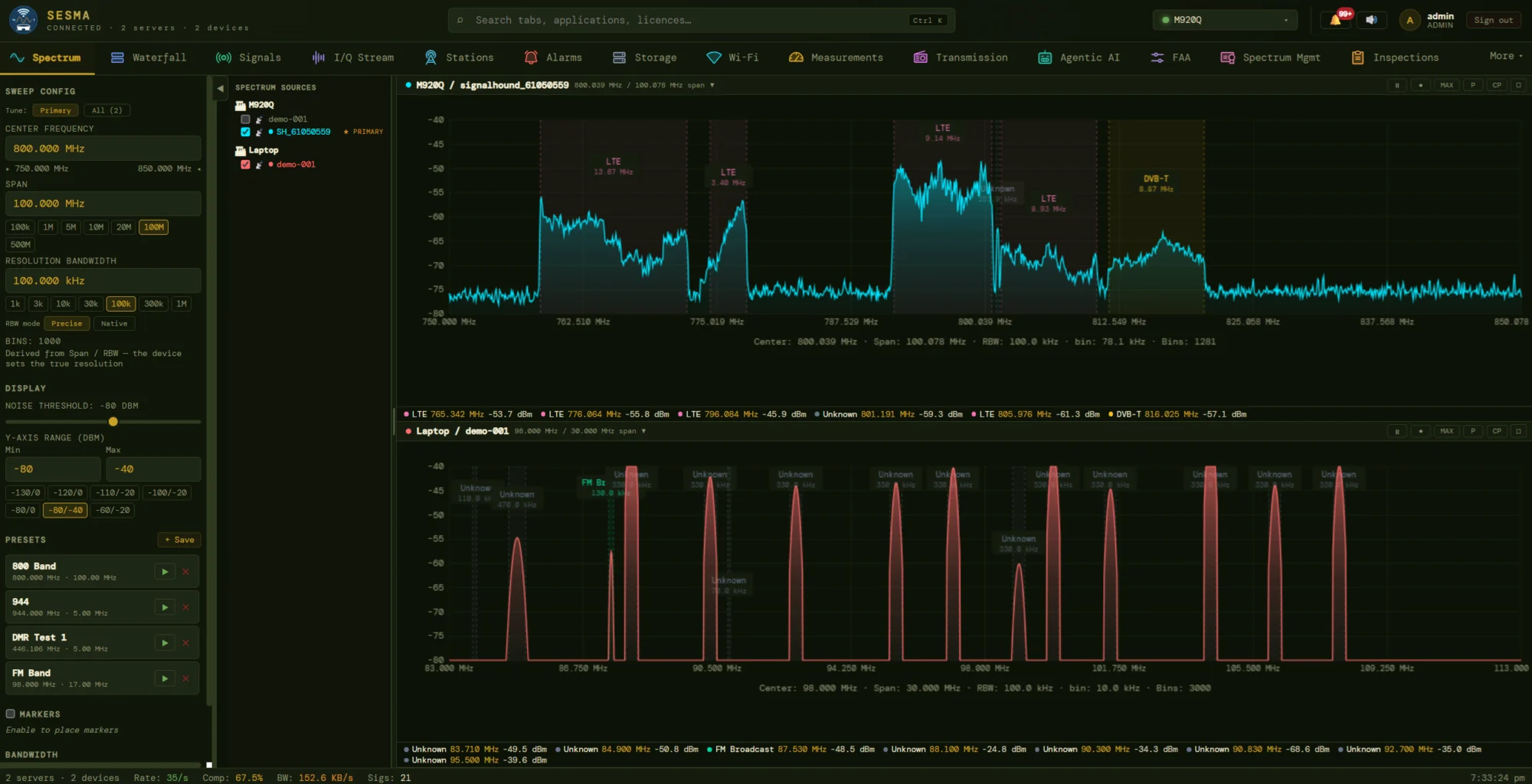
The Spectrum view puts traces from several stations on screen at the same time, each with its own centre, span and resolution bandwidth. Detected emissions are boxed and labelled in place — LTE carriers, a DVB-T multiplex, FM broadcast and unidentified signals — and listed with frequency and power along the bottom edge of every plot.
- Source tree lists every station and device; tick any receiver to add it, and choose whether a retune drives the primary source or all of them.
- Sweep controls offer span and RBW presets from 100 kHz to 500 MHz, Precise or Native RBW, adjustable noise threshold and Y-axis range.
- Saved presets (800 Band, FM Band, DMR Test…) retune the fleet in one click; markers pin observations to the trace.
- Bandwidth meter in the status bar shows the stream compression ratio and data rate, so operators on slow links see what a view costs.
Waterfall
A wall of waterfalls you can rearrange
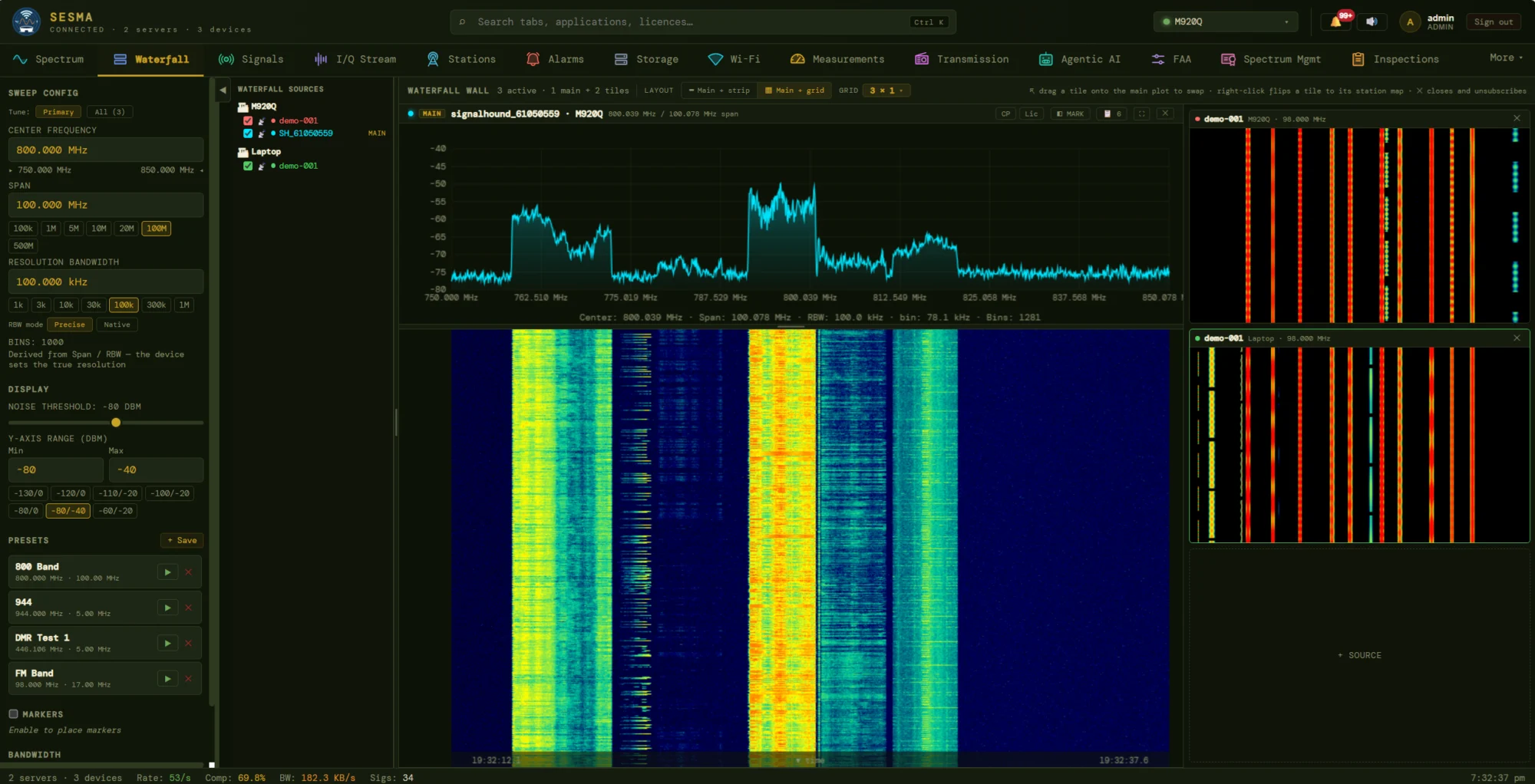
Time is the missing dimension of a spectrum trace. The Waterfall wall stacks a full-size trace and waterfall for the main source above a history of seconds to minutes, and surrounds it with tiles from other receivers — a second station, a second band — so intermittent emissions, burst transmitters and drifting carriers stand out as they happen.
- Main + strip or main + grid layouts with a configurable grid; add a tile with one click on the source slot.
- Drag a tile onto the main plot to swap it in; right-click flips a tile to its station on the map; closing a tile unsubscribes it so no bandwidth is wasted.
- Toolbar overlays for channel plans, licences and markers sit on the same plot as the waterfall.
- Time-stamped axis keeps every frame traceable, so a screenshot is evidence as well as a picture.
Licence & channel-plan overlay
What the register says, drawn over what the air shows
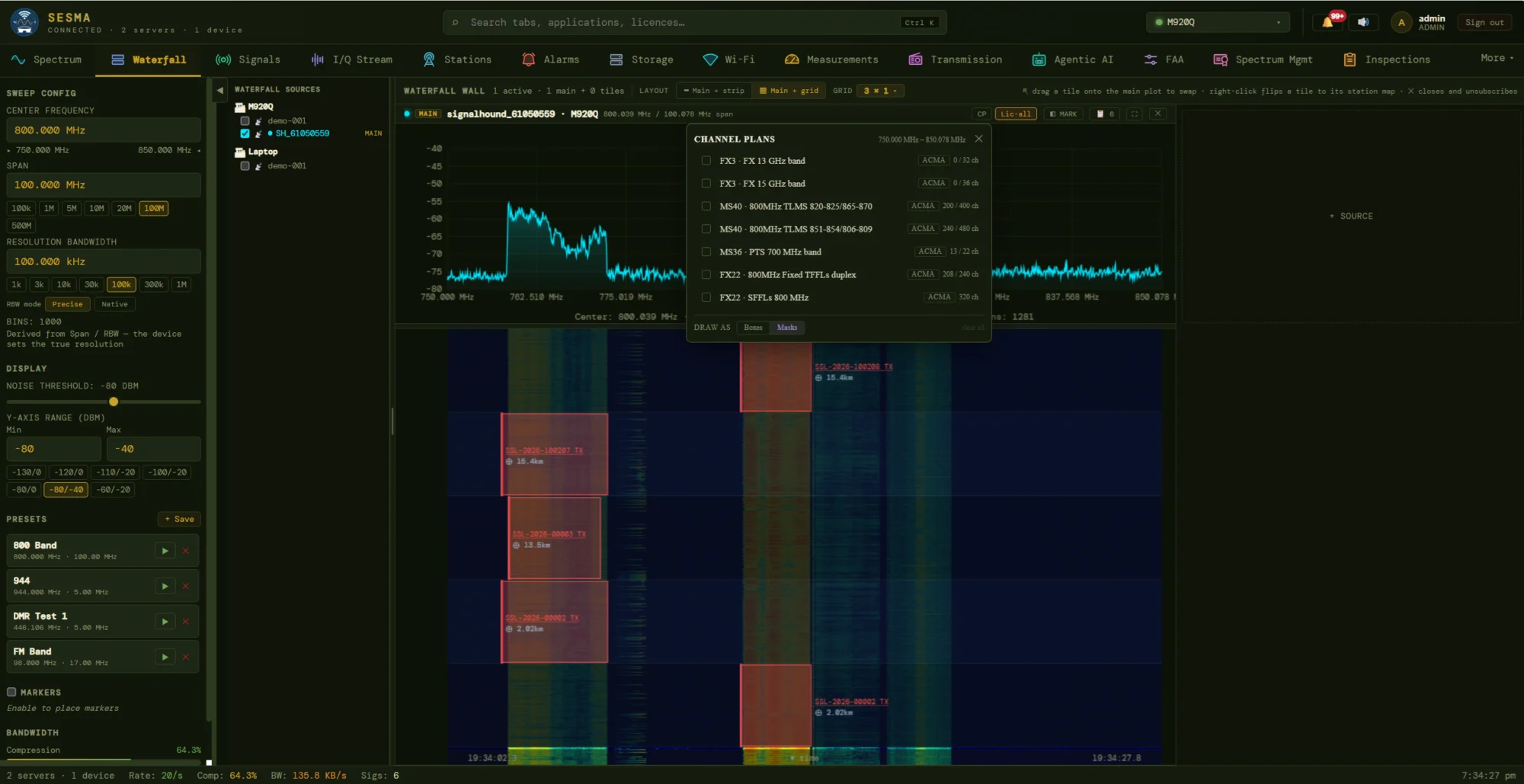
Turning on the licence overlay paints every assignment in the visible band directly over the waterfall, each labelled with its licence reference and its distance from the station. A signal that sits inside a box is accounted for; energy outside any box is a question worth asking. The channel-plan picker adds the national band plan itself — fixed-link duplex pairs, trunked-radio and PTS bands — so channels can be read against the plan, not only against licences.
- Three states — licensed, unlicensed and unmeasured — so a quiet licence is told apart from a missing one.
- Plans carry their usage: each lists how many of its channels are already licensed (for example 240 of 480).
- Draw as boxes or masks to see channel edges or the spectral mask the licence allows.
- Click through from any box to the licence record behind it.
02Identify — what is actually there
Signals
Every emission classified, measured and scored
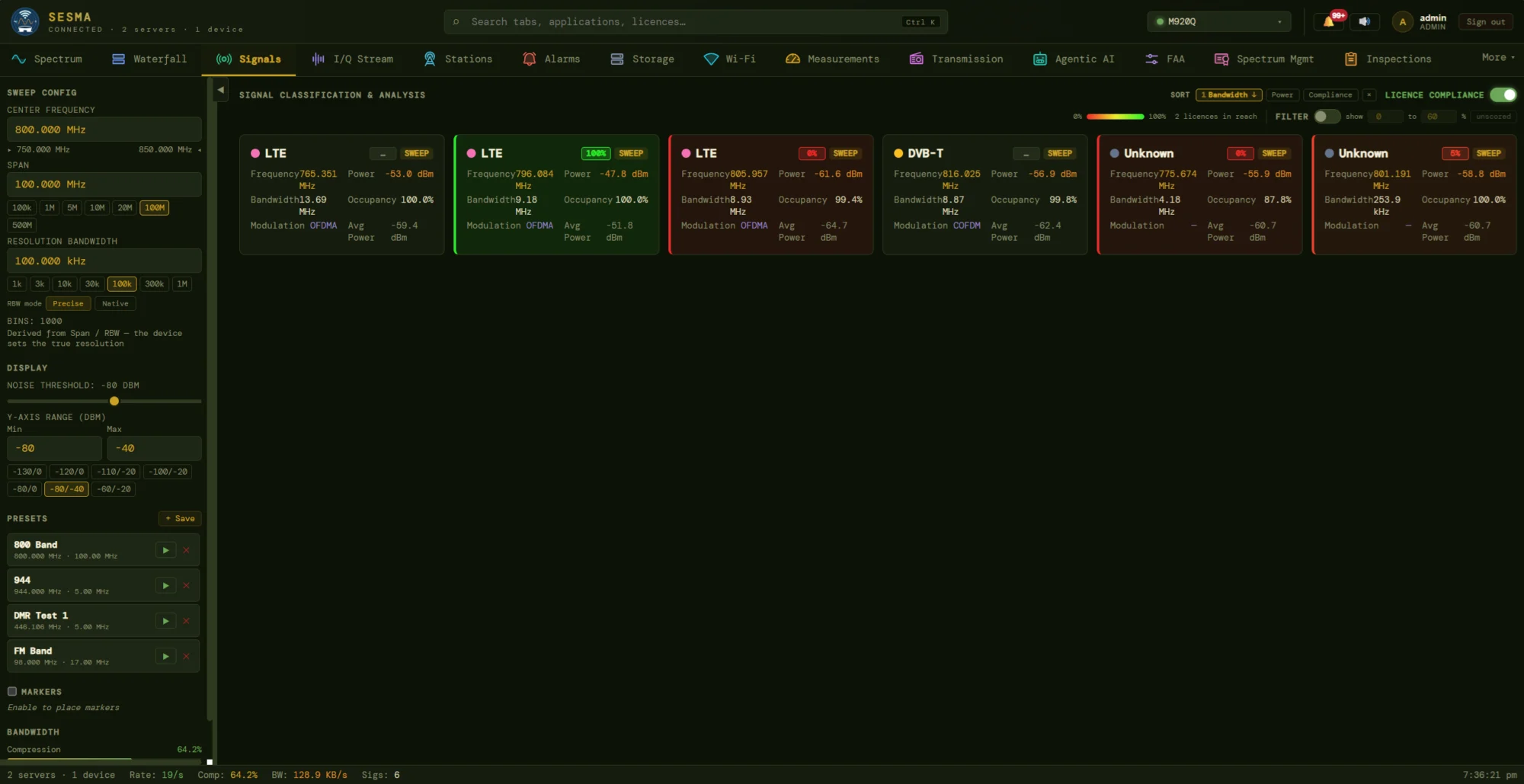
Continuous detection turns a trace into a list of signals. Each becomes a card: the technology the neural classifier believes it is (LTE, DVB-T, unknown), its centre frequency, occupied bandwidth, peak and average power, duty-cycle occupancy and modulation family (OFDMA, COFDM). Switch on licence compliance and every card also carries a score for how well the emission matches the licences in reach.
- Green, amber, red cards at a glance: 100% is a clean match, 0% is an emission no licence explains.
- Sort and filter by bandwidth, power or compliance, or show only a chosen score range to work the worst cases first.
- Honest about uncertainty: emissions with no licence to compare against read “unscored” rather than guessed.
- Origin tag shows whether a detection came from a live sweep or a stored one.
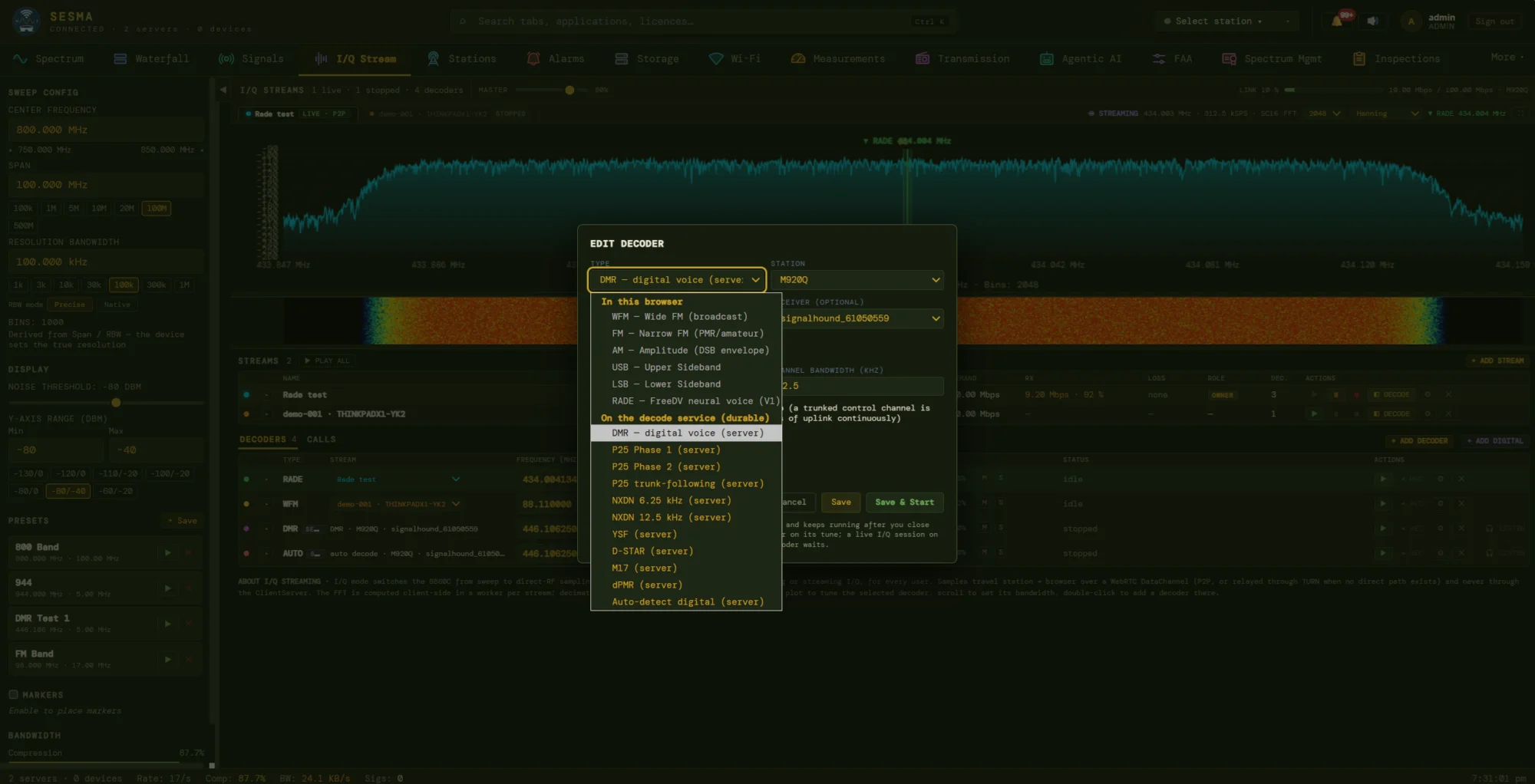
I/Q Stream
From a spike on the screen to the conversation inside it
I/Q mode switches a receiver from sweeping to direct-RF sampling and streams the raw samples to the officer’s browser over a WebRTC data channel, peer to peer, or relayed through TURN when no direct path exists. The samples never pass through the application server. The FFT is computed in the browser, one worker per stream, so a stream stays responsive on a modest laptop.
- In the browser: WFM, FM, AM, USB, LSB and RADE neural voice demodulate live, with per-stream master volume.
- On the decode service: DMR, P25 Phase 1 and 2, P25 trunk-following, NXDN 6.25 and 12.5 kHz, YSF, D-STAR, M17, dPMR and automatic digital detection.
- Durable decoders keep running after the tab is closed; decoded calls are collected in a Calls list.
- Stream roles (owner, viewer) and link health show who has the receiver and how the path is behaving.
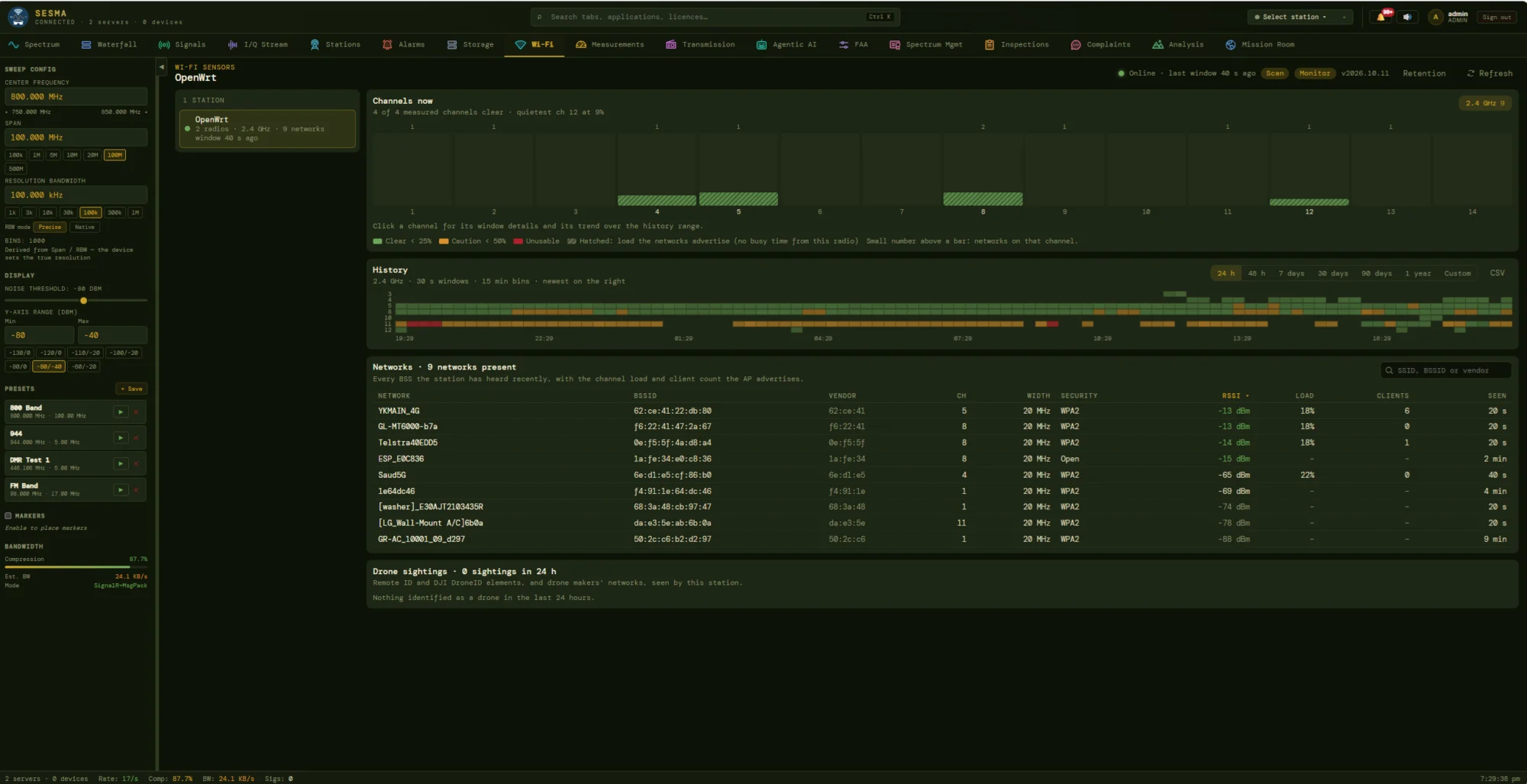
Wi-Fi sensors
The unlicensed bands, measured too
Low-cost OpenWrt sensors extend monitoring into the licence-exempt Wi-Fi bands that carry most of a venue’s wireless traffic. Each radio reports per-channel load, every network it can hear, and a continuous history, so a coordinator can say which channels are usable for the event and prove it afterwards.
- Channels now grades every channel clear, caution or unusable, and names the quietest.
- History as a heat-strip over 24 hours, 48 hours, 7, 30 or 90 days, one year or a custom range, with CSV export.
- Network table lists SSID, BSSID, vendor, channel, width, security, RSSI, load, client count and last-seen time.
- Drone sightings decodes Remote ID and DJI DroneID elements and logs any aircraft seen by the station.
03Plan — allocate before you license
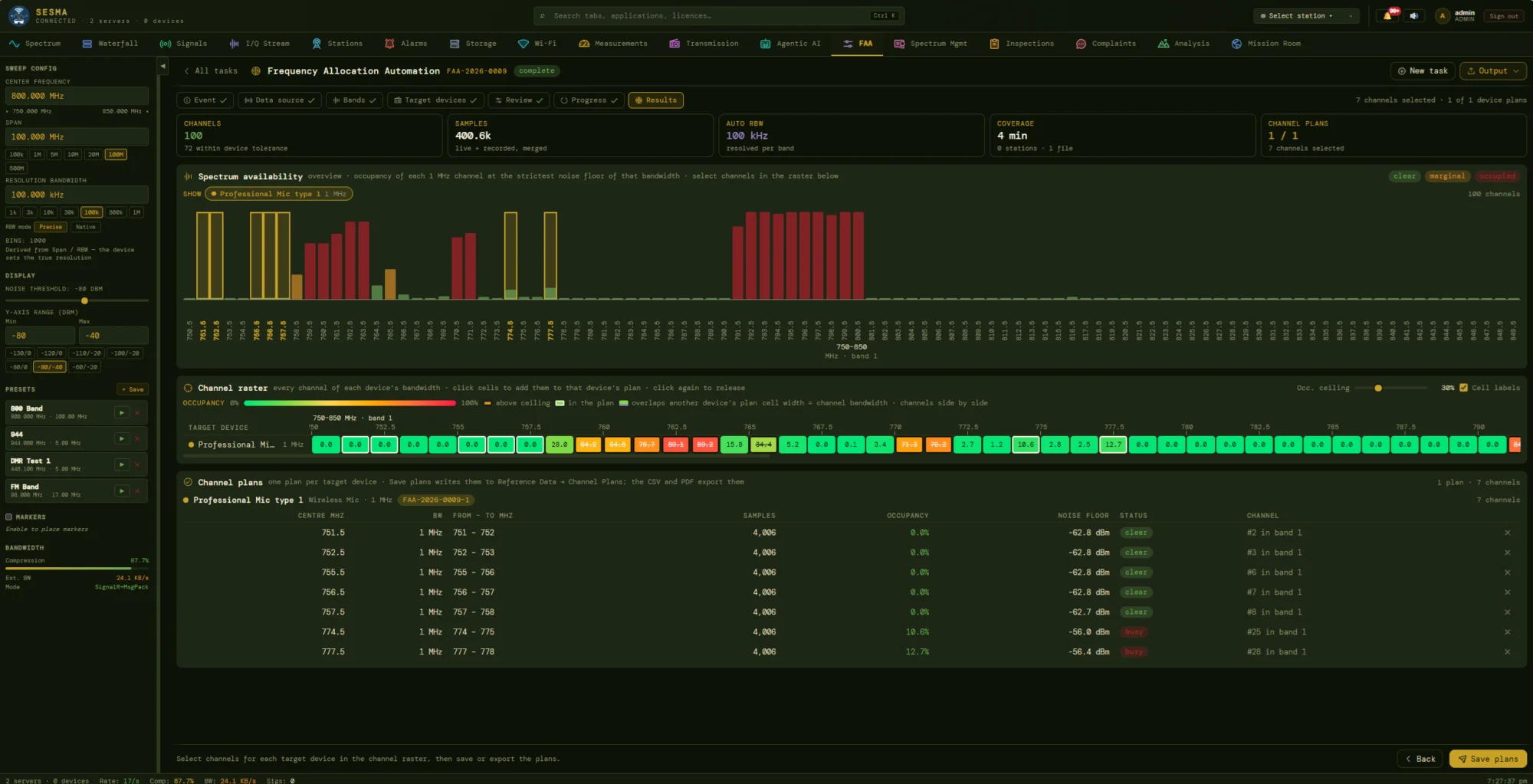
Frequency Allocation Automation
Clear channels, found by measurement
Special events need dozens of wireless microphones, comms and video links working at once, in a venue where the air is already full. An FAA task walks the coordinator through event, data source, bands, target devices and review, then measures real occupancy from live and recorded sweeps merged together. The result is a ranked list of channels per device type, with the evidence behind each.
- Availability overview colours each channel clear, marginal or occupied, judged against the noise floor at the chosen bandwidth.
- Channel raster lets the planner click cells into a device’s plan and flags overlaps with another device’s channels; an occupancy-ceiling slider sets how strict “clear” is.
- Per-device plans list centre, band edges, samples, occupancy and noise floor for every chosen channel.
- Save plans to reference data, or export to CSV and PDF for the event frequency list.
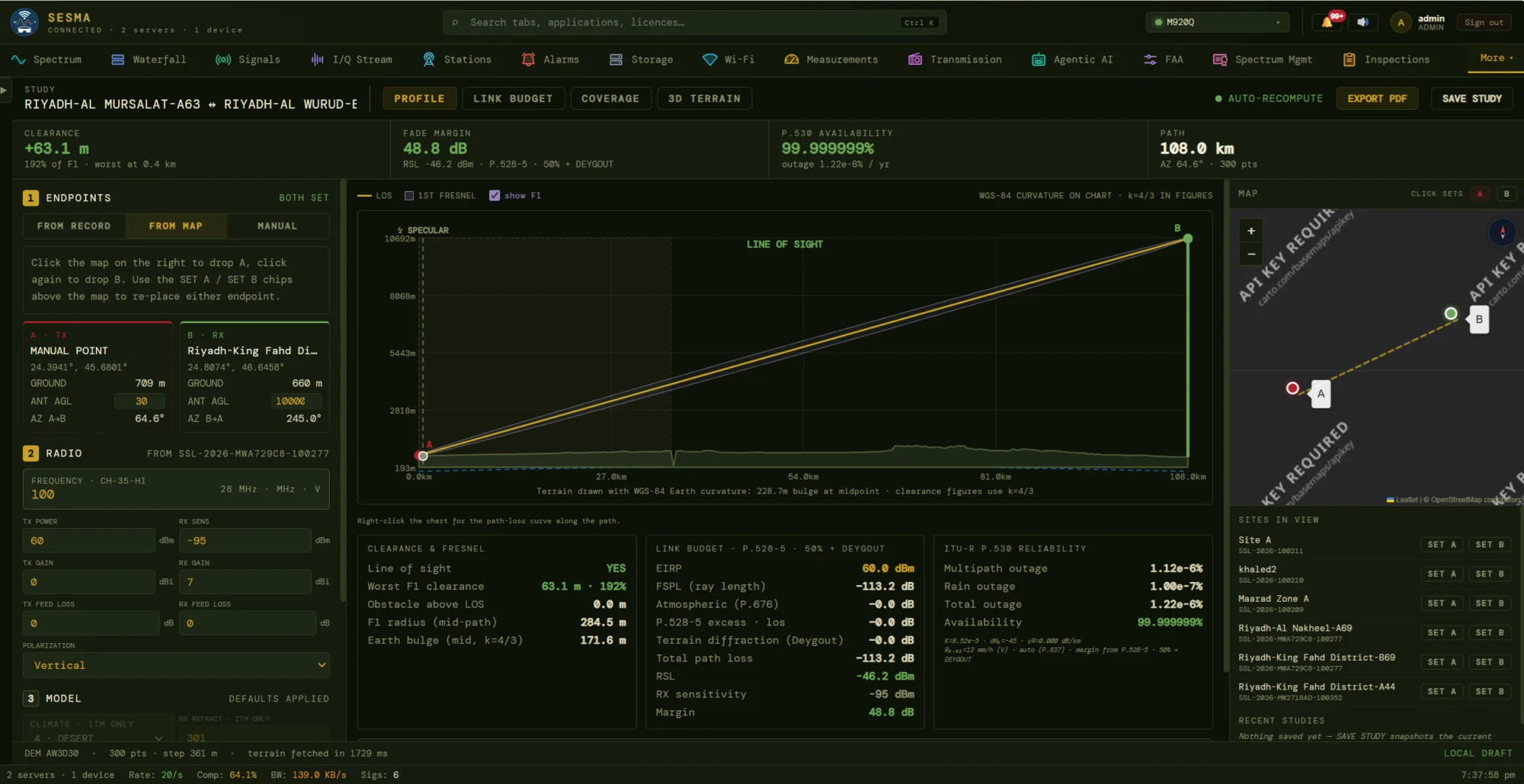
Coverage & propagation
A defensible link study in a few clicks
Pick two endpoints from licence records, from the map or by hand, and SESMA fetches the terrain, draws the path with Earth curvature and Fresnel zone, and recomputes the engineering as parameters change. The example shown has 63.1 m of worst-case clearance, a 48.8 dB fade margin and an availability beyond six nines.
- Profile, Link budget, Coverage and 3D terrain tabs share a single set of endpoints and radio parameters.
- Link budget follows the P.528 / P.530 chain: EIRP, free-space and atmospheric loss, diffraction, RSL, sensitivity and margin.
- Reliability splits outage into multipath and rain contributions and expresses annual availability.
- Save study to the file or export a formatted PDF; terrain comes from AW3D30 elevation data.
04Locate — see where it is, and how well you can find it
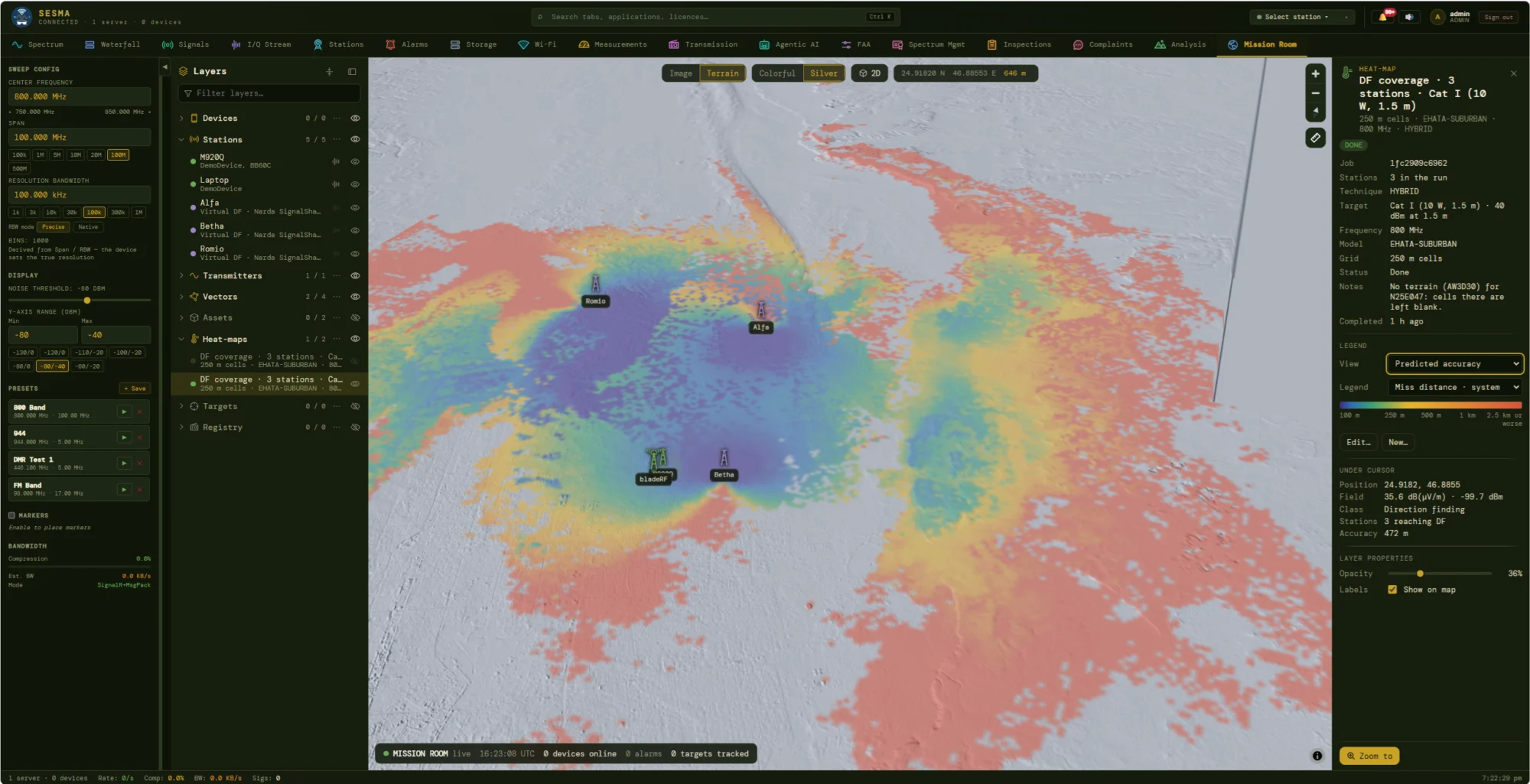
DF coverage heat-map
Know your direction-finding accuracy before you need it
Locating an interferer is only as good as the geometry of the stations looking for it. SESMA computes, for a chosen target class (here a 10 W, 1.5 m handheld at 800 MHz), how many stations can hear it in each cell and how far off the fix is likely to be. Planners see at once where three stations give a sub-kilometre fix, and where a mobile team is needed.
- Predicted accuracy view maps expected miss distance from 100 m to 2.5 km or worse, with further views selectable from the same legend.
- Under-cursor readout gives position, field strength, class (for example Direction finding), stations reaching and accuracy for any point.
- Propagation models such as EHATA-SUBURBAN on a configurable grid, run as queued jobs with terrain-gap notes.
- Virtual and real stations mix freely, so a deployment can be rehearsed before hardware is moved.
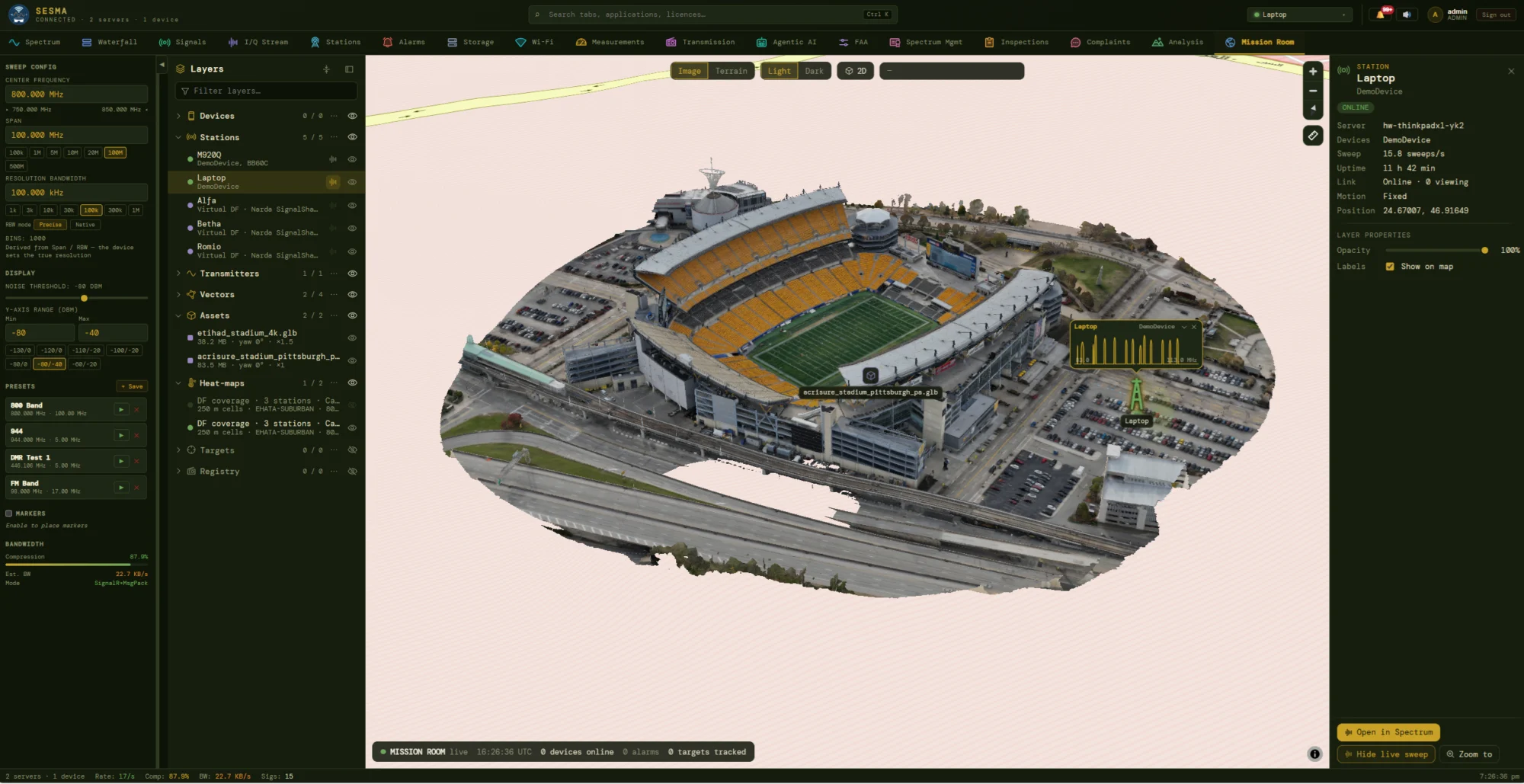
Mission Room
The whole operation on one map, in 2D or 3D
The Mission Room is the common operating picture. Devices, stations, transmitters, bearing vectors, 3D assets, heat-maps, targets and the licence registry are layers in a tree: toggle, filter and fade each one. Venue models load as glTF, placed with a position, yaw and scale, so a stadium appears as a stadium and an antenna sits where it will be mounted.
- Station panel shows server, devices, sweep rate, uptime, link state and position, with one click to the live Spectrum view.
- Live sweep pop-up floats a station’s current trace over the map at its location.
- Basemaps in imagery or terrain, light or dark; the footer counts devices online, alarms and targets tracked.
- Heat-maps and coverage from the planning tools drop onto the venue as layers.
05Engage — test signals and the people who apply
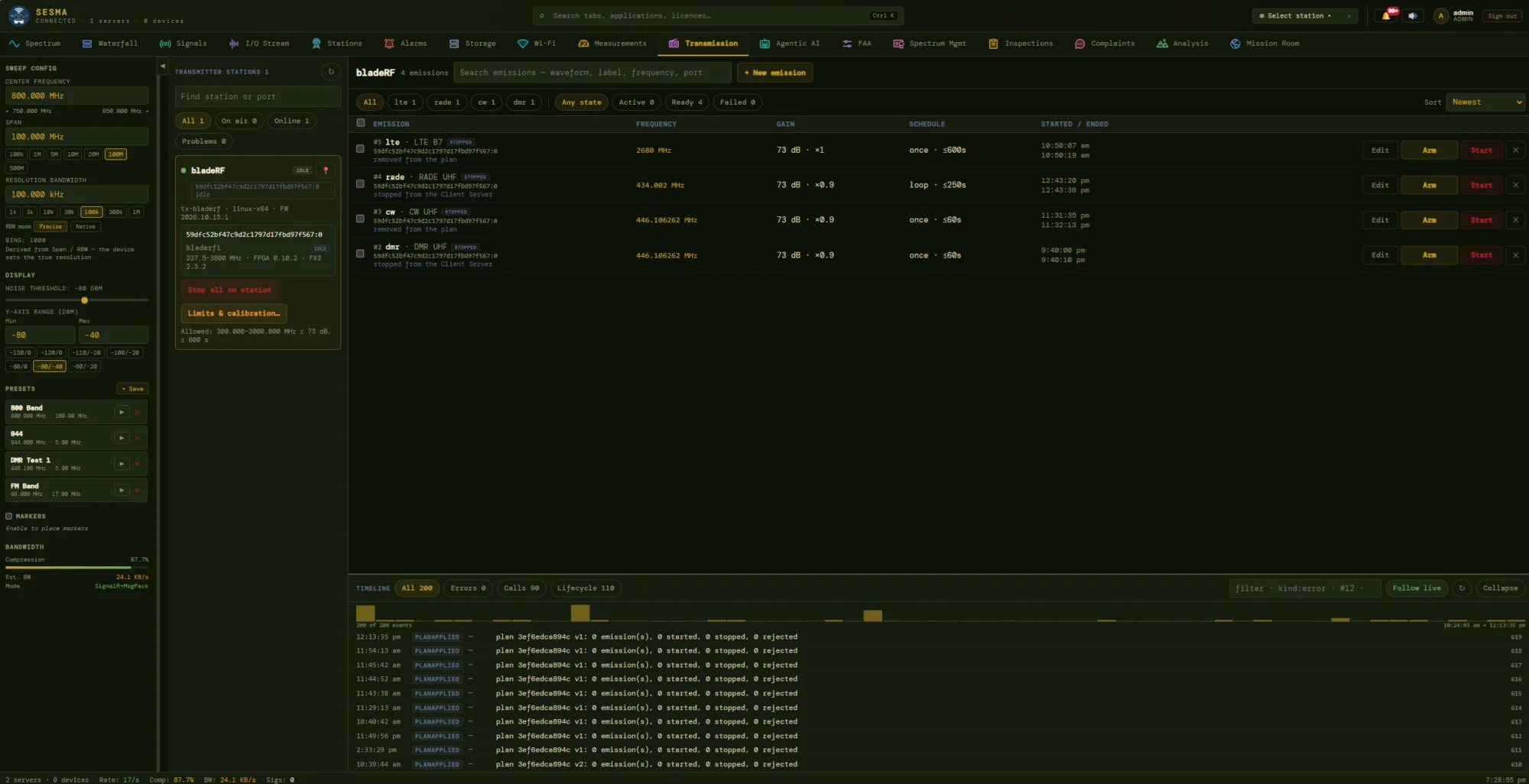
Transmission
Authorised reference signals, under strict limits
To prove that a monitoring chain really sees what it should, a software-defined transmitter station can radiate known test emissions on demand: LTE, RADE voice, CW and DMR waveforms, each planned in advance with a frequency, gain and schedule. Nothing leaves the station unless it is armed, within the station’s permitted range and power, and every step is written to the timeline.
- Emission list filters by waveform and state (active, ready, failed) and runs once, on a loop or for a set duration.
- Arm, then start as two separate steps, with a one-click Stop-all for the whole station.
- Limits and calibration cap frequency range, gain and duration per station.
- Timeline records plan applications, calls and lifecycle events, with error filtering and a follow-live mode.
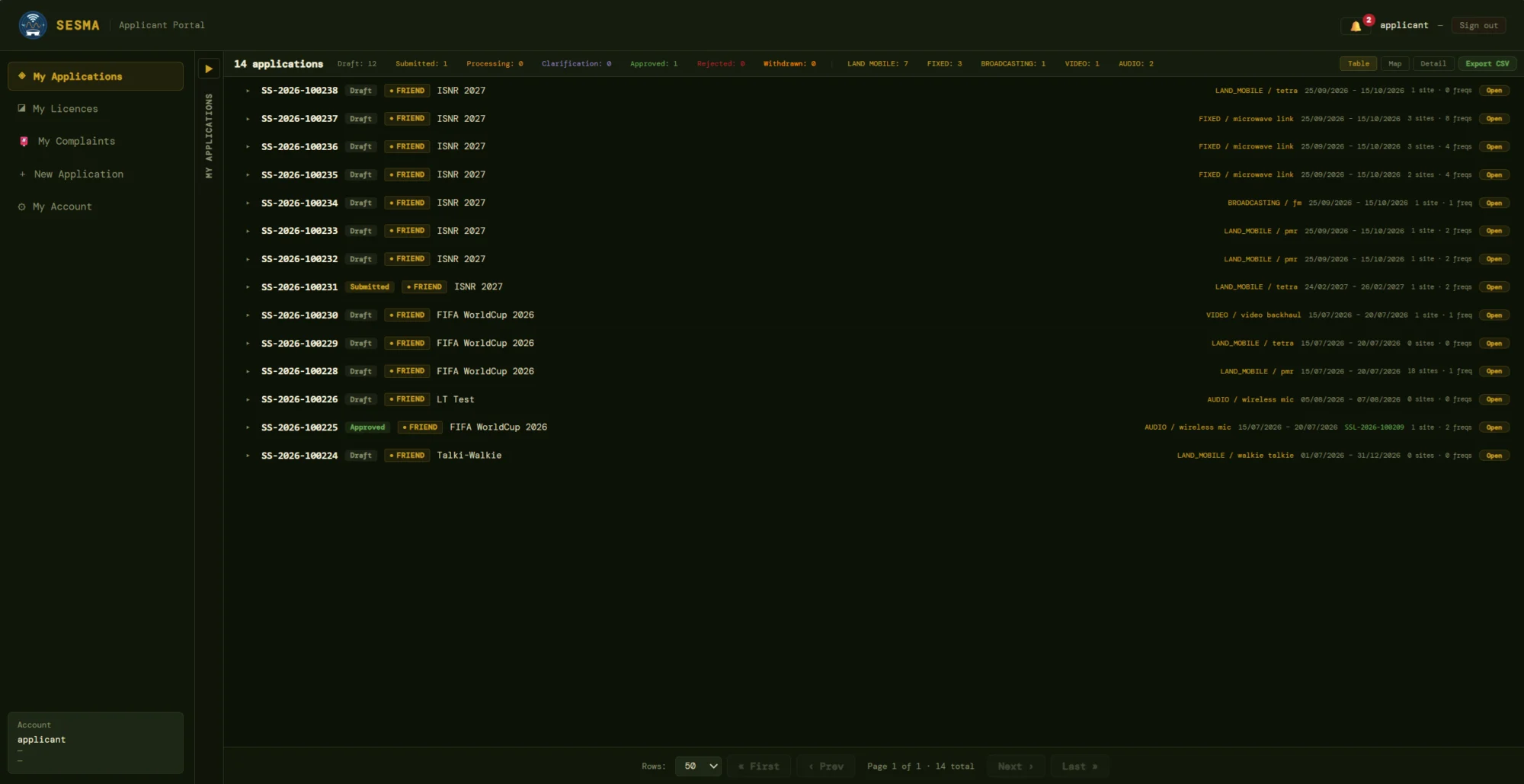
Applicant portal
Applicants serve themselves; the licensing desk stays on the hard cases
Operators, broadcasters and event organisers get their own sign-in. They create applications through a guided wizard validated against the national frequency plan, see exactly where each one stands, answer clarification requests in the same thread, and find their issued licences, complaints and account details in one place.
- Status strip counts draft, submitted, processing, clarification, approved, rejected and withdrawn, and by service type: land mobile, fixed, broadcasting, video, audio.
- Each row shows event, service and type, validity dates, site and frequency counts, and the licence number once granted.
- Table, map and detail views with paging and CSV export of the whole list.
- My Licences and My Complaints keep holdings and interference reports within the applicant’s own view.
Modules
Platform Modules
Sixteen functional modules, grouped here into the eight areas a spectrum authority works in day to day. All are surfaces of a single deployment sharing one dataset, one security model and one audit trail.
01
Spectrum Licensing Workflow
Paged applications queue with live workload badges, three-role approval pipeline, two-way clarification threads and atomic licence issuance with public QR verification. Every status transition, field edit and approval is journalled with actor and timestamp — including before-and-after values for every technical parameter.
02
Licence Registry & Applicant Portal
Server-side searchable catalogue with health counters, frequency-range windows, map radius and polygon filters, and CSV export. Applicants self-register, build applications through a guided wizard validated against the national frequency plan, and track their own applications, licences and complaints without calling the licensing desk.
03
Frequency Allocation & Interference Analysis
Availability verdicts per channel with clashing licences ranked by distance, distance sweep with congestion heat-map, and a full microwave interference engine covering inbound and outbound impact. Frequency Allocation Automation measures event bands and produces per-device channel plans. Analysis snapshots freeze the officer’s exact interference landscape onto the file so a decision stays reviewable years later.
04
Monitoring, Decoding, Recording & Playback
Multi-receiver live view, multi-source waterfall wall with three-state licence and channel-plan overlay, per-frequency alarm engine with CSV bulk import, and live I/Q streaming over WebRTC with in-browser demodulation and a decode service for digital voice. Wi-Fi sensor stations add channel load, history and drone detection. Recordings carry GPS bounding box and operator attribution for chain of custody, and stream progressively on slow links.
05
Measurement Campaigns & Signal Classification
Missions aligned to ITU-R SM.1880 measurement types run unattended across the station fleet, pulling licensed frequencies in bulk and warning where a device’s range doesn’t cover the plan. Background missions yield the receiver to interactive users automatically, and signals matching no licence holder are flagged as unauthorised use with a per-emission compliance score.
06
Field Inspections & Complaints
Formal inspection lifecycle with structured compliance verdicts, categorised evidence with EXIF auto-metadata, live GPS tracks and on-site contact registers. Complaints arrive structured and SLA-tracked, with a public thread, a private investigation thread, and one-click escalation to a pre-seeded site visit.
07
Coverage, Propagation, DF Planning & the Mission Room
Terrain cross-sections, link budgets with annual availability estimates, multi-edge diffraction and queued coverage simulation, all delivered as a formatted engineering report. Direction-finding coverage heat-maps predict locating accuracy per cell. Geo-located 2D and 3D venue scenes place antennas and cameras with visible beam cones, signal heatmaps and live target overlays.
08
Hardware Fleet, Test Transmission & Administration
Stations self-enrol from a single installer, discover their receivers and GPS automatically, and hold individually revocable credentials rotatable with a grace window. Transmitter stations run armed, limit-checked reference emissions with a full event timeline. Administrators get live platform status, session inspection, filterable audit logs, MFA policy control and editable numbering prefixes and reference data.
Compatibility
Standards-Aligned, Out of the Box
SESMA implements recognised measurement, propagation, protocol and interchange standards so its outputs are defensible to auditors and portable to specialist tooling. Receiver support is vendor-agnostic, and additional device types can be integrated on demand.
ITU-R SM.1880
Occupancy measurement
ITU-R P.530
Link availability
ITM Longley-Rice
Terrain coverage
EHATA
Urban / suburban prediction
Deygout
Multi-edge diffraction
AW3D30
Terrain elevation data
DMR · P25 · NXDN
Digital voice decoding
D-STAR · YSF · M17 · dPMR
Digital voice decoding
WebRTC / TURN
Browser I/Q transport
Remote ID · DJI DroneID
Drone detection
Signal Hound
Auto-discovered receivers
bladeRF
Transmitter stations
HTZ Warfare
EWX export
MSI / ADF / PLT
Antenna patterns
glTF / GLB
3D site models
PMTiles
Offline basemaps
TOTP MFA
Standard authenticators
Applications
Designed for Real-World Operations
SESMA carries a national authority across the full lifecycle, and scales down without modification to the compressed, high-density demands of special-event spectrum coordination.
- National Licensing & Assignment
- Special-Event Spectrum Coordination
- Unauthorised Transmission Detection
- Interference Investigation & Resolution
- Compliance Field Inspections
- Link Planning & Coverage Assessment
- Wireless-Microphone & Event Channel Planning
- Direction-Finding Deployment Planning
- Drone & Wi-Fi Environment Awareness
Product
SESMA v1.0
Special Events Spectrum Management Automation. SESMA is a registered product of Resonix Solutions.